| Test ID | SAGE-ADCS-TR-9002 |
|---|
| Parent Test ID | - |
| Requirement ID | - |
| Test Object | Cube ADCS Development Model |
| Model | - |
| Test Type | Hardware in the Loop trial |
| Testing Session | 1 |
| Facility | ETH Hanger Dübendorf Electronics Lab |
| Date | 28.03.2025 |
| Trial Number | 1 |
| Total Number of Trials | 1 |
Introduction
This experiment is a first test of the Hardware in the Loop (HIL) functionality of the CubeADCS DM and the EOS simulator. Three EOS simulations shall be run with the HIL functionality of EOS, while connected to the CubeADCS DM.
Test Operators
| Test Role | Project Role | Full Name |
|---|
| Test Lead | ADCS Team Lead | Samuel Schönenberger |
| Tester | ADCS Member | Andreas Dombos |
| Tester | Systen Engineer | Kai Berszin |
Test Setup
Ground Support Equipment
| Equipment Name | Identification |
|---|
| Computer with Windows 7 or higher with USB-A port | |
| CubeSpace CubeADCS Design Model Power Supply | |
| Oscilloscope | |
| Multi-Meter | |
| Power Supply (10V to 17.6V at current limit set to 1.5A) | |
| DC Power Cable | |
| Cube Support PCB | |
| PCAN USB | |
| UART to USB Cable | |
Test Object Configuration
Software Configuration
| Software | Version |
|---|
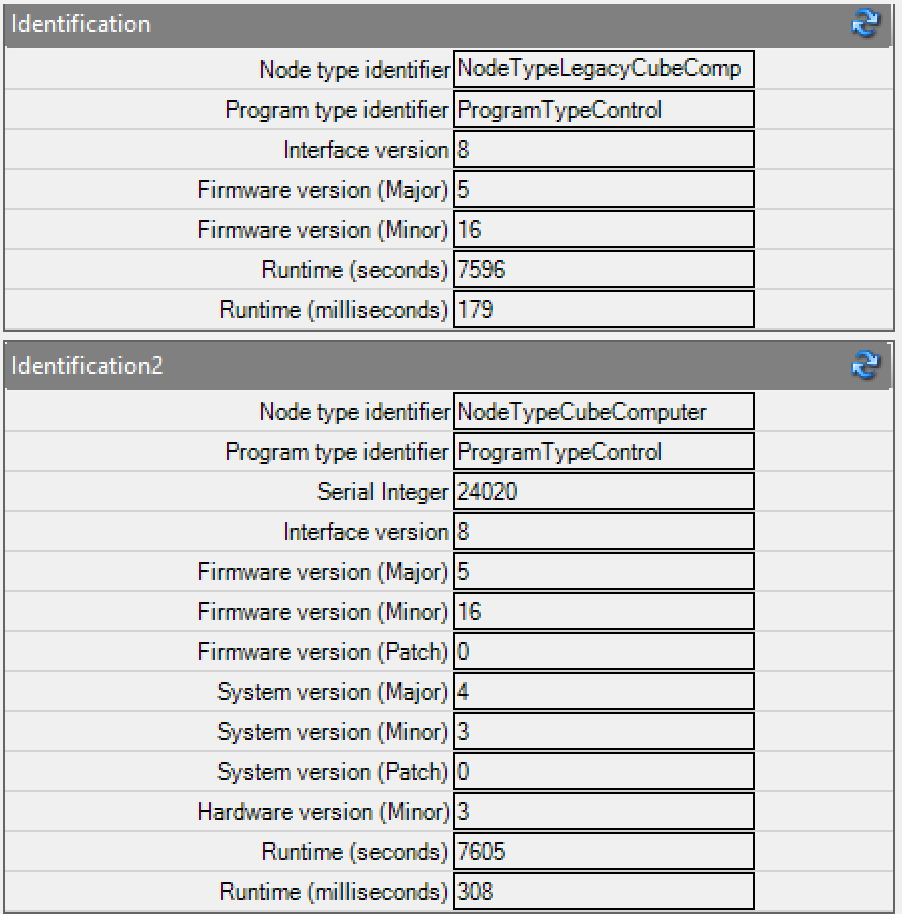
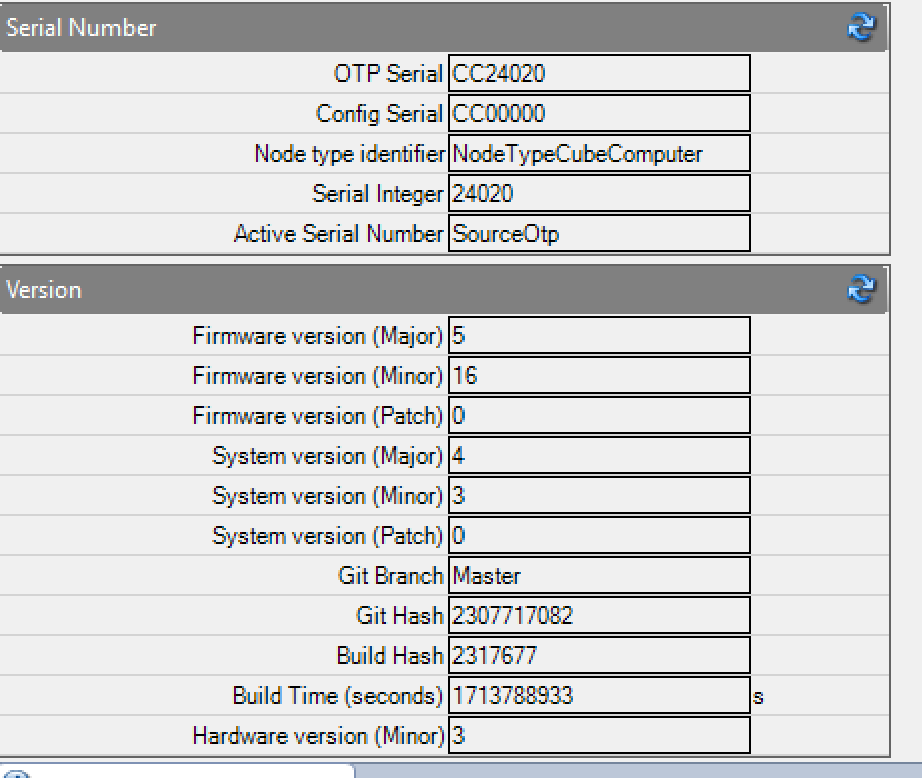
| CubeSupport Software | v4.3.0.3 |
| EOS Satellite Simulation software | v1.13.3 |
| base-bootloader-cube-common-1-computer-5.3 | v1.5 |
| control-program-cube-computer-5 | v5.16.0 |
| D2S2 sattelite simulation | 1.0.19.3 |
| CubeSpace Library (D2S2 Plugin) | 1.0.10.0 |
Test Execution
Test Procedure
| ID | Procedure | Notes |
|---|
| 1 | Powering up the CubeADCS and connecting it to the CubeSupport PCB | |
| 2 | Connecting via CAN | |
| 3 | Activate EOS on Windows PC | |
| 4 | Clone latest version of repository | |
| 5 | Test EOS-Cubespace test script with DM in HIL mode | |
| 6 | Test Detumbling script on EOS with DM in HIL mode | |
| 7 | Test Sun Pointing script on EOS with DM in HIL mode | |
| 8 | Test Ground Tracking script on EOS with DM in HIL mode | |
| 9 | Turning D2S2 scenario into HIL scenario via execution of HIL Setup script | Success |
| 10 | Connecting to D2S2 | Fail :( |
Test Results
| Time | Objective | Pass/Fail | Comments |
|---|
| 17:00 - 21:10 | Test EOS-Cubespace test script with DM in HIL mode | Fail | Steps documented in anomaly. Question sent to CubeWade. |
| Test Sun Pointing script on EOS with DM in HIL mode | | |
| Test Ground Tracking script on EOS with DM in HIL mode | | |
| Test Detumbling script on EOS with DM in HIL mode | | |
| HIL Setup | Pass | |
| Connecting to D2S2 | Fail | Error below; buy CubeWade Pinata to hit very very hard |
Anomalies
EOS
We had issues during HIL attempt 1:
- We set up all the hardware correctly (CubeSupport works as intended)
- We tried everything with UART and CAN and the same error popped up.
- We used EOS with the aris-sage.eos file that you provided.
- Clicked the HIL button.
- We set all the configs correcly. (Screenshot 1.) (We get the same error regardless of switching "Must Match" to True or False.)
- Then we tried setting "connected" to True.
- Then we get the error "TCTLM NACK: Length Invalid (ID=54)"
D2S2
Issues when connecting D2S2 with CubeADCS DM:
| Interface | Configuration must match | Error Message | Note |
|---|
| UART | False | "Error in intialisation of remote ADCS: Error: TC Truncated / Corrupted reply (invalid length)" | |
| UART | True | "Error in intialisation of remote ADCS: Error: TLM Truncated / Corrupted reply (invalid length)" | |
| PCAN | False | "Error in initialisation of remote ADCS: NACK received in response to TC (ID = 62)" | |
| PCAN | True | "Error in initialisation of remote ADCS: Received reply with invalid length (ID: 190, received length=91, expected length = 98) | This seems to be related to the "Reserved" 7 bits in the Controller Config. We don't know how to set those. Maybe the issue is something else. |
Note: This is after converting the CubeComputer in the scenario to a HIL enabled CubeComputer using the HIL setup script.
Conclusions
This is still failing everytime.